
A hands-on guide to catching simulations bugs with automated tests

TL;DR
What you’ll learn: Write rigorous tests for randomized algorithms without arbitrary thresholds.
What you’ll get: A failing test that catches a subtle directional bias bug with Bayes factor = 10⁷⁹ (decisive evidence).
The approach: Run simulations many times, count outcomes, validate proportions using Bayesian hypothesis testing. The heart of this Fuzzy Checking Pattern is this method
fuzzy_checker.fuzzy_assert_proportion(
    observed_numerator,
    observed_denominator,
    target_proportion,
)
The Problem: How Do You Test Randomized Algorithms?
Imagine you’re using computer simulation in your research, like an agent-based model or a Monte Carlo simulation. You run your code and it produces output. Then you run it again and get different output. That’s expected! It’s random. But here’s the challenge:
How do you know your “random” behavior is actually correct?
Traditional unit tests fail:
# This doesn't work - random walks vary!
assert result == 42

# Neither does this - what threshold?
assert 40 <= result <= 44
This tutorial, inspired by Greg Wilson’s testing challenge, demonstrates a rigorous solution: Bayesian fuzzy checking using the FuzzyChecker from vivarium_testing_utils.
An Answer: Bayesian Hypothesis Testing
Instead of asking “is this close enough?” (with arbitrary thresholds), ask: “What’s the evidence ratio for bug vs. no-bug?”
We’ll do this with the Bayes factor:
- Bayes factor > 100 = “decisive” evidence of a bug → Test FAILS
- Bayes factor < 0.1 = “substantial” evidence of correctness → Test PASSES
- Bayes factor between 0.1 and 100 = “inconclusive” → WARNING (need more data)
The Bug We’ll Catch
We’ll test a simple 2D random walk simulation. The walker starts at the center of a grid and takes random steps (left, right, up, down) until it reaches an edge.
The correct implementation uses four moves:
moves = [[-1, 0], [1, 0], [0, -1], [0, 1]] # left, right, up, down
The buggy implementation has a subtle typo:
moves = [[-1, 0], [1, 0], [0, -1], [0, -1]] # left, right, up, up (!)
Can you spot it? [0, -1] appears twice (up), and [0, 1] (down) is missing!
Impact: The walker can move left (25%), right (25%), up (50%), but never down (0%). This creates a bias that’s hard to spot with traditional asserts but shows up dramatically in statistical tests.
(If you want to run this on your own, you can find some instructions for getting set up here.)
The Fuzzy Checking Pattern
I have separated my simulation code (random_walk.py) from my automatic testing code (test_random_walk.py). I recommend this for you, too. The simulation does your science, the tests check if your science has bugs.
1. Write Your Simulation (in random_walk.py)
The fill_grid(grid, moves) function simulates a random walk and returns where it ended:
def fill_grid(grid, moves):
    """Fill grid with random walk starting from center."""
    center = grid.size // 2
    size_1 = grid.size - 1
    x, y = center, center
    num = 0

    while (x != 0) and (y != 0) and (x != size_1) and (y != size_1):
        grid[x, y] += 1
        num += 1
        m = random.choice(moves)
        x += m[0]
        y += m[1]

    return num, x, y  # Steps taken and final position
See random_walk.py lines 45-70 for the code in context.
2. Test by Calling Your Implementation
This random walk is symmetric, so I expect 25% of walks to exit at each edge. Let’s test that. Run many simulations and count where they exit:
from random_walk import Grid, fill_grid, CORRECT_MOVES

num_runs = 1000
num_left_exits = 0

for i in range(num_runs):
    random.seed(2000 + i)
    grid = Grid(size=11)

    num_steps, final_x, final_y = fill_grid(grid, CORRECT_MOVES)

    if final_x == 0:
        num_left_exits += 1
3. Assert with Bayes Factors
FuzzyChecker().fuzzy_assert_proportion(
    observed_numerator=edge_counts["left"],
    observed_denominator=num_runs,
    target_proportion=0.25
)
The Core Method: fuzzy_assert_proportion()
This method performs Bayesian hypothesis testing to validate that observed proportions match expectations:
from vivarium_testing_utils import FuzzyChecker

# Example: Validate that ~25% of walks exit at left edge
FuzzyChecker().fuzzy_assert_proportion(
    observed_numerator=254,       # 254 walks exited left
    observed_denominator=1000,    # Out of 1000 total walks
    target_proportion=0.25,       # We expect 25%
)
How It Works
- Defines two distributions:
- H₀ (no bug): Based on your target proportion
- H₁ (bug): Broad prior (Jeffreys prior by default)
- Calculates Bayes factor:
BF = P(data | bug) / P(data | no bug) - Decides:
- BF > 100 → Decisive evidence of bug →
AssertionErrorraised - BF < 0.1 → Substantial evidence of no bug → Test passes silently
- 0.1 ≤ BF ≤ 100 → Inconclusive → Warning (need more data)
- BF > 100 → Decisive evidence of bug →
The buggy random walk exits left only 3% of the time (expected 25%):
pytest test_random_walk.py::test_buggy_version_catches_exit_bias -v

AssertionError: buggy_left_exit_proportion value 0.03 is significantly less than expected, bayes factor = 1.37e+79
That’s astronomically decisive evidence of a bug. The buggy version can move up twice but never down, so 94.6% of walks exit at the top edge, dramatically reducing other exits.
Key Files in This Tutorial
random_walk.py
The simulation implementation:
Gridclass – Simple 2D grid for tracking visitsfill_grid(grid, moves)– Random walk that returns (steps, final_x, final_y)CORRECT_MOVESandBUGGY_MOVESconstants- Command-line interface for running single simulations
Run a simulation:
python random_walk.py --seed 42 --size 11
test_random_walk.py
Test suite with:
- One test for the correct version (validates exit edge proportions)
- One test for the buggy version (demonstrates catching the bug)
- Examples of using
fuzzy_assert_proportion()with exit locations
Run the tests with:
pytest test_random_walk.py
Adapting This for Your Own Work
Ready to use fuzzy checking in your own spatial simulations? Here’s how:
Step 1: Install the Package
pip install vivarium_testing_utils pytest
Step 2: Identify Statistical Properties
What should your simulation do in aggregate?
- Agent-based models: “30% of agents should be in state A”
- Monte Carlo: “Average outcome should be between X and Y”
- Spatial sims: “Density should be symmetric when flipped horizontally or vertically”
Step 3: Write Fuzzy Tests
import pytest
from vivarium_testing_utils import FuzzyChecker

@pytest.fixture(scope="session")
def fuzzy_checker():
    checker = FuzzyChecker()
    yield checker
    checker.save_diagnostic_output("./diagnostics")  # this pattern saves a csv for further inspection

def test_my_property(fuzzy_checker):
    # Run your simulation many times
    successes = 0
    total = 0

    for seed in range(1000):
        result = my_simulation(seed)
        if condition_met(result):
            successes += 1
        total += 1

    # Validate with Bayesian inference
    fuzzy_checker.fuzzy_assert_proportion(
        observed_numerator=successes,
        observed_denominator=total,
        target_proportion=0.30,  # Your expected proportion
        name="my_property_validation"
    )
Step 4: Tune Sample Sizes
- Small samples (n < 100): Tests might be inconclusive
- Medium samples (n = 100-1000): Good for most properties
- Large samples (n > 1000): High power to detect subtle bugs
If you get “inconclusive” warnings, increase your number of simulation runs.
A Challenge: Can You Find the Bug With Even Simpler Observations?
The tests above observe exit locations. But can you detect the bug using only the grid visit counts?
This is perhaps Greg Wilson’s original challenge: find a statistical property of the grid itself that differs between correct and buggy versions.
Some ideas to explore:
- Does the distribution of visits differ between quadrants?
- Are edge cells visited at different rates?
- Does the center-to-edge gradient change?
- What about the variance in visit counts?
- Can you detect the bias without even tracking final positions?
Try implementing a test that catches the bug using only the grid object returned after the walk.
Additional Challenges: Deepen Your Understanding
Ready to experiment? Try these exercises to build intuition about fuzzy checking:
1. Sample Size Exploration
Reduce num_runs from 1000 to 100 in the directional balance test.
- What happens to the Bayes factors?
- Do tests become inconclusive?
- How many runs do you need for decisive evidence?
2. Create a Subtle Bug
Modify the moves list to this alternative buggy version: [[-1, 0], [1, 0], [1, 0], [0, -1], [0, 1]] (two right moves instead of two up moves; this erroneous addition to the list means that the random walk has some chance to exit from each side).
- Does fuzzy checking catch this subtler bias?
- How does the Bayes factor compare to the up/down bug?
- What does this reveal about detection power?
3. Validate New Properties
Write a new test that validates:
- The center cell is visited most often
- The walk forms a roughly circular distribution
- The total path length scales as (grid size)²
Hint: For the center cell test, compare grid[center, center] to the average of edge cells using fuzzy_assert_proportion().
Further Reading
- Vivarium Testing Utils (GitHub) – The source package
- Vivarium Fuzzy Checking Docs – Detailed methodology
- Greg Wilson’s Testing Question – The original challenge
Conclusion
Testing stochastic simulations doesn’t have to rely on arbitrary thresholds or manual inspection. Bayesian fuzzy checking provides a rigorous, principled approach:
✅ Quantifies evidence with Bayes factors ✅ Expresses uncertainty naturally ✅ Catches subtle bugs that traditional tests may miss
The vivarium_testing_utils package makes this approach accessible with a simple, clean API. Whether you’re testing random walks, agent-based models, or Monte Carlo simulations, fuzzy checking helps you validate statistical properties with confidence.
What About More Complex Simulations?
This tutorial used a simple random walk where tracking direction counts was straightforward. But what about more complex spatial processes?
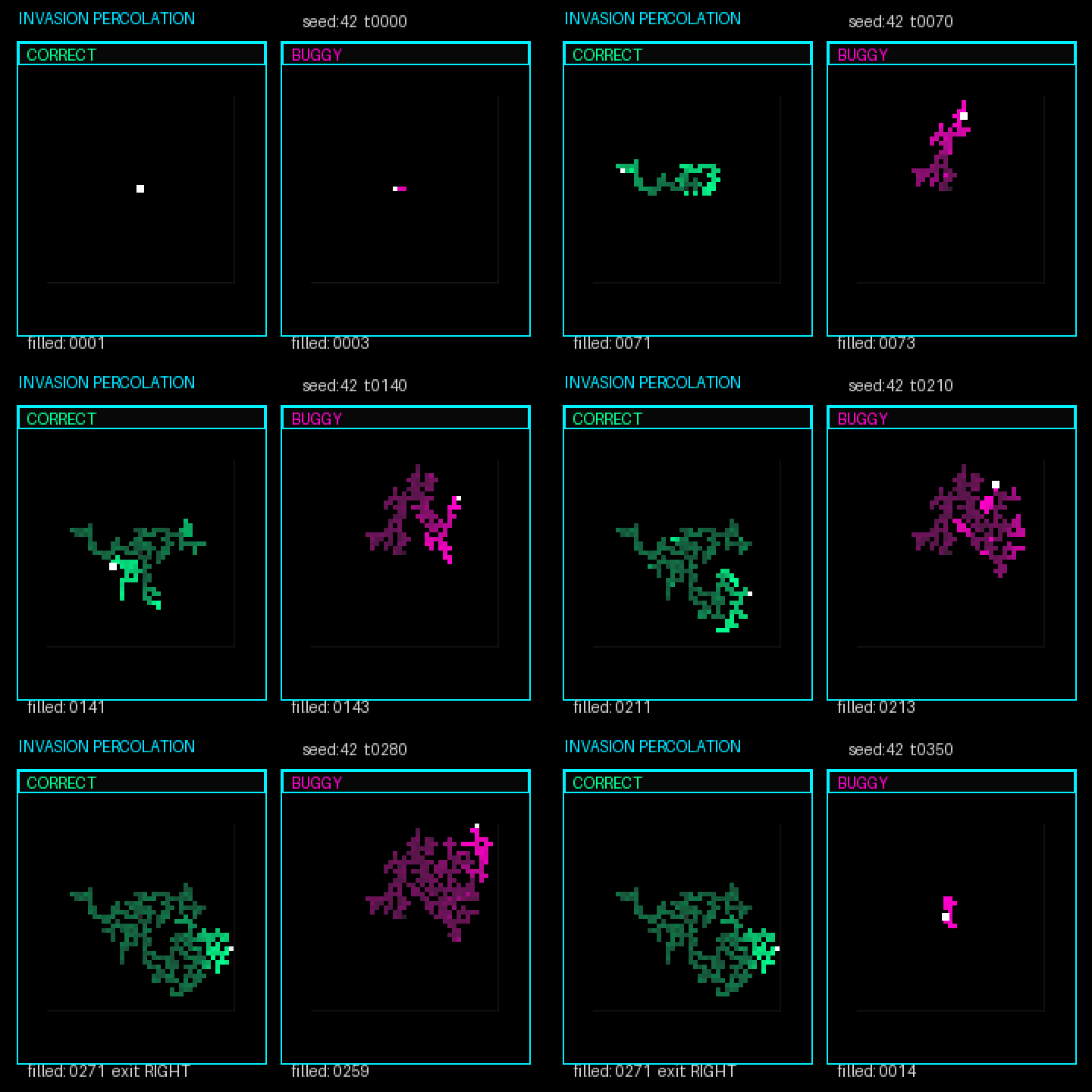
Greg Wilson’s blog post includes another example: invasion percolation, where a “filled” region grows by randomly selecting neighboring cells to fill next. The grid patterns are much more complex than a random walk.
How would you test that? What statistical properties would you validate? How would you instrument the code to observe the right quantities?
This tutorial was created to demonstrate practical statistical validation for spatial simulations. The fuzzy checking methodology was developed at IHME for validation and verification of complex health simulations.
 Healthy Algorithms